


Introduction
The Consistent Character Template is designed for teams who need the same character to appear reliably across multiple images, scenes, or deliverables. Whether you are creating marketing assets, storyboards, character sheets, or visual narratives, this template provides a structured Runnit Board workflow that prioritizes character consistency first.
The key decision happens before the board begins: do you train a character LoRA, or do you rely on a single reference image? This article explains both paths and shows how the Consistent Character Template fits into a production-ready workflow on RunDiffusion.
Industries and Use Cases
The Consistent Character Template is used across industries where character identity needs to remain stable across multiple images, scenes, or deliverables.
Common use cases include:
- Marketing and Branding
- Brand mascots
- Campaign characters
- Product lifestyle imagery with recurring people
- Entertainment and Media
- Storyboards
- Concept art
- Character sheets for games, animation, or comics
- Architecture and Real Estate
- People placed consistently in architectural visualizations
- Lifestyle scenes across multiple renders
- Marketing imagery with the same human presence
- E-Learning and Training
- Instructional characters
- Explainer visuals
- Course imagery requiring continuity
- I-Gaming and Interactive Entertainment
- Slot characters and themed game mascots
- Promotional characters used across multiple campaigns
- Consistent avatars for in-game UI, splash screens, and marketing assets
If your project requires the same character to appear repeatedly without visual drift, this template provides a structured way to manage that consistency inside a Runnit Board.
Choosing the Right Character Workflow
Not every project needs character training. This template supports two valid approaches.

LoRa and Template
Use this approach if:
- The character will be reused across many images or scenes for longer campaigns, stories, games etc.
- Visual identity must remain consistent over time
- You want predictable results across multiple generations
- You will need to create a lot of concept images with your character.
This path uses a trained character LoRA and is the primary workflow for the Consistent Character Template.
Template Only
Use this approach if:
- The character changes often
- You only have a single reference image or a few reference images.
- Speed is more important than reuse
In this case, Nano Banana Pro is used directly, without training. This avoids setup time but is best suited for short-lived or exploratory work due to costs.
For teams that do not need a reusable long term character:
- Use Nano Banana Pro with a single reference image
- Perform major edits and camera changes directly
- Optionally use Seedream 4.5 for light cleanup
- Finish with Topaz Upscale
Train a Character LoRA (Before Using the Template)
For stable characters, LoRA training is recommended. The Consistent Character Template assumes that the character identity is already trained and available.
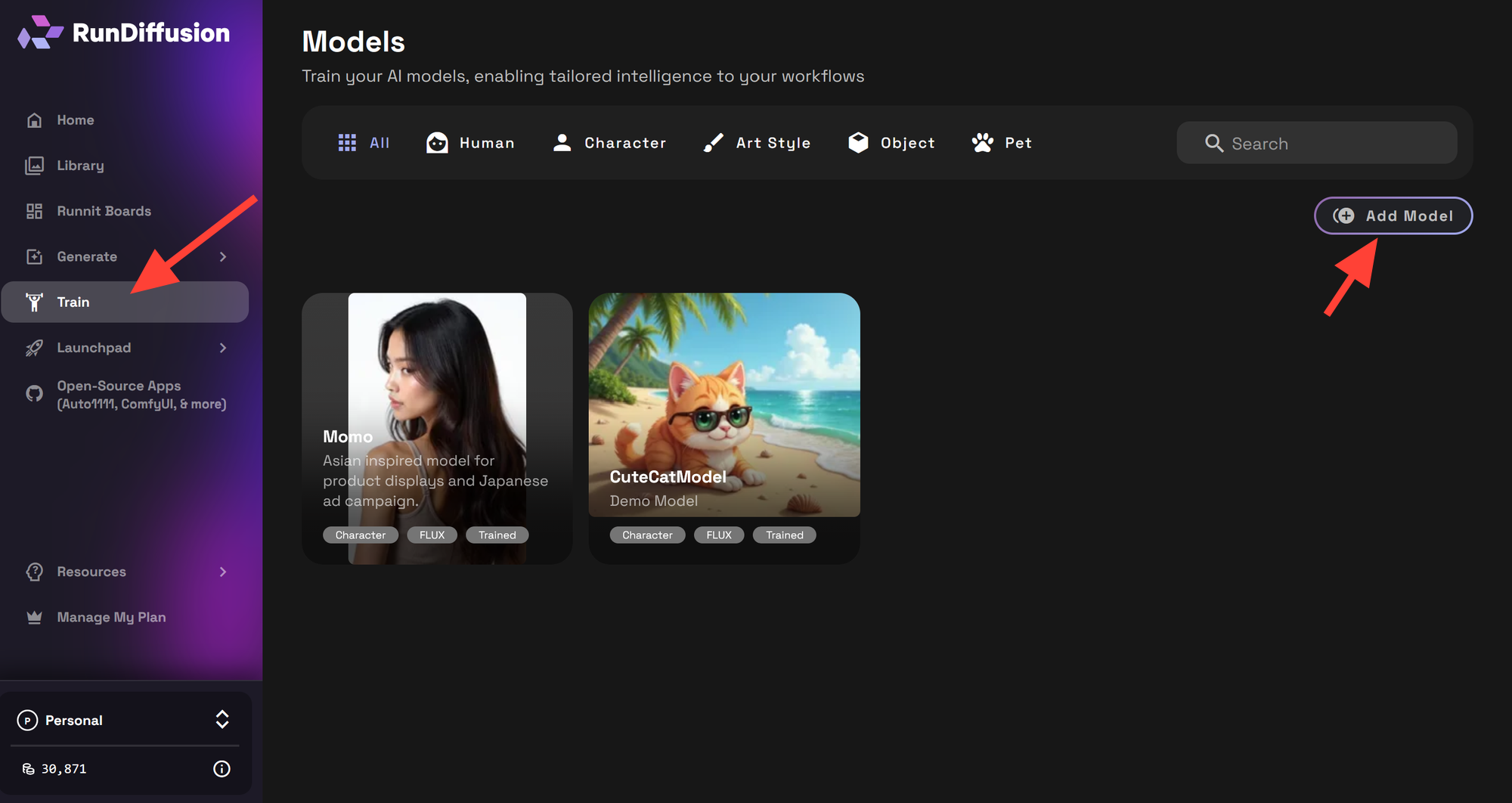
Recommended Training Guidelines

- Ideal dataset size: 15–30 reference images
- This range provides strong identity learning without unnecessary training overhead
Your dataset should include:
- Front and profile views
- A variety of expressions
- Consistent defining features
- Neutral lighting and backgrounds
- Varied backgrounds
You can train your character using the Runnit Standard Trainer.
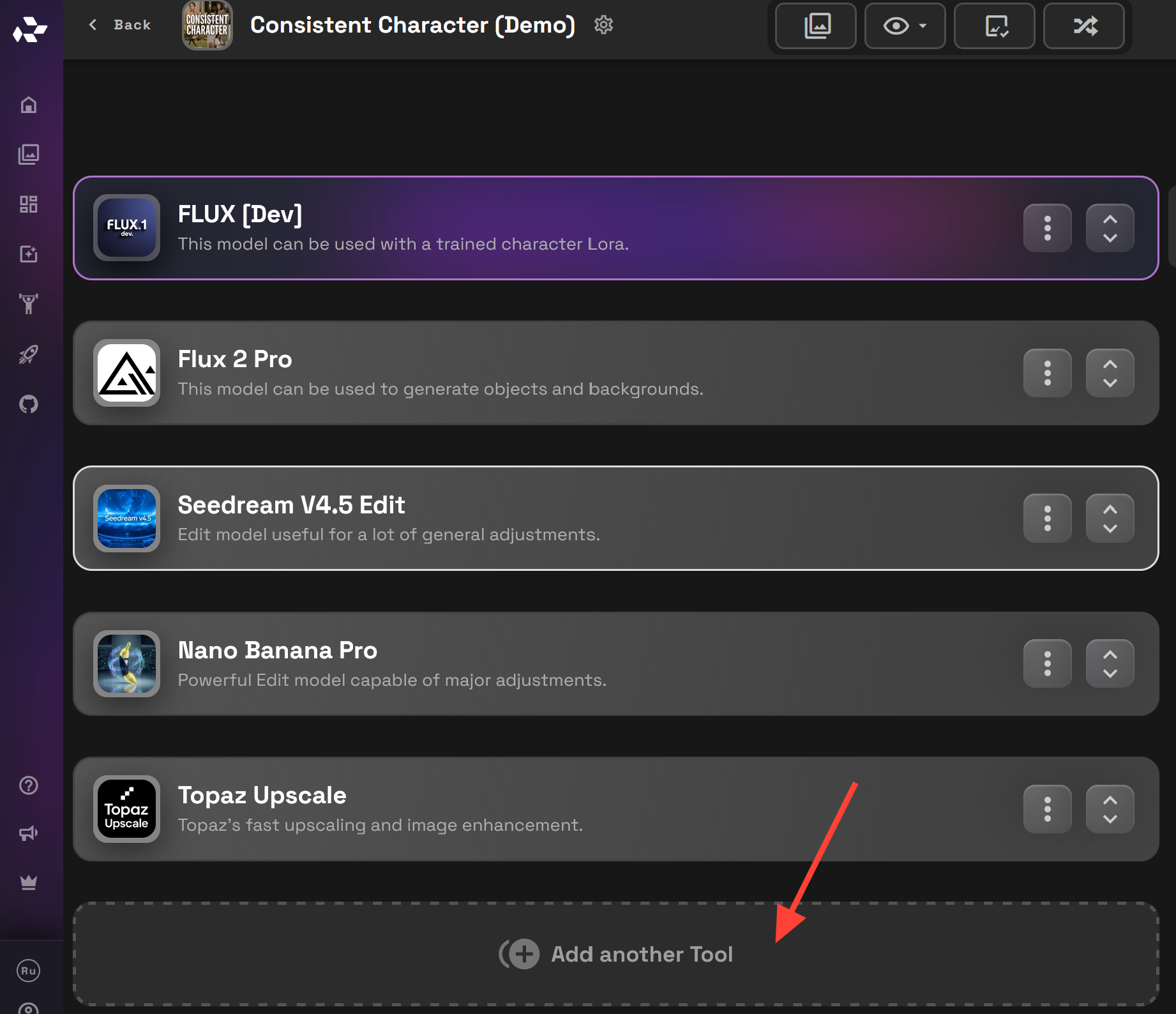
Once training is complete, the LoRA can be used create your character in Flux [Dev] inside the board template.
How to Launch the Consistent Character Template
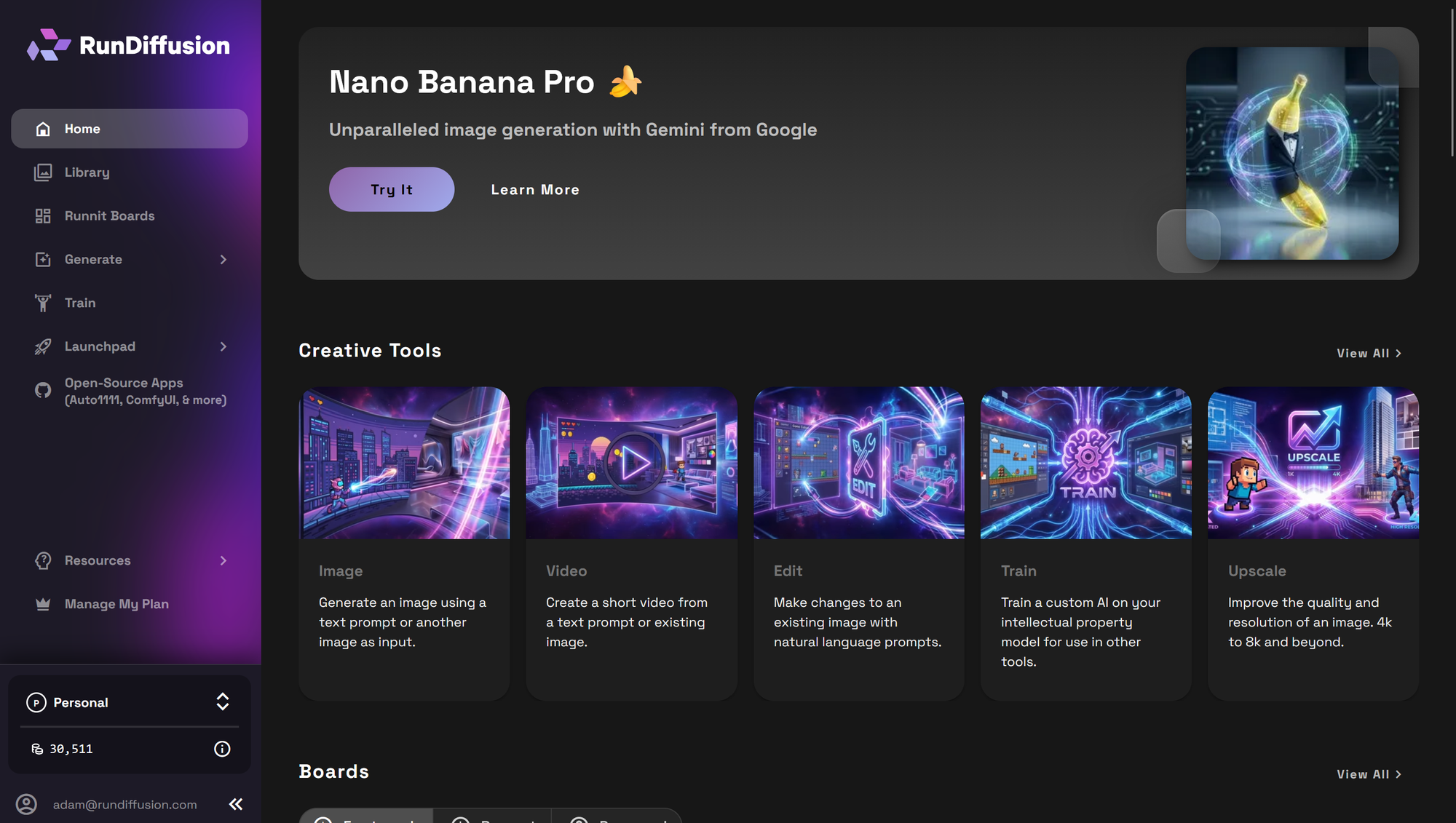
The Consistent Character Template is launched from Runnit and used inside a single board. Before launching the template, confirm whether you are using a trained character LoRA or a single reference image.
Login to RunDiffusion and navigate to the RunDiffusion's Runnit Platform.
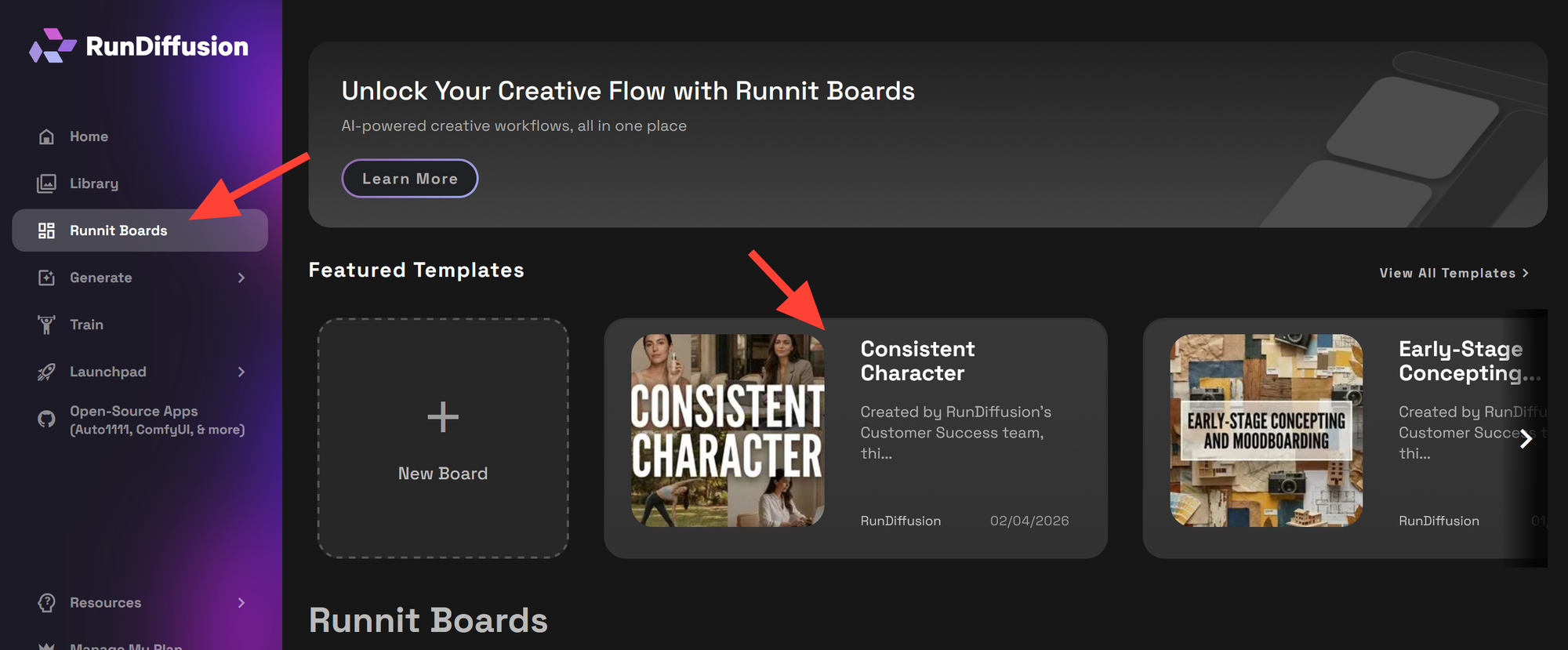
Click on Runnit Boards on the left sidebar then click on the Consistent Character template.
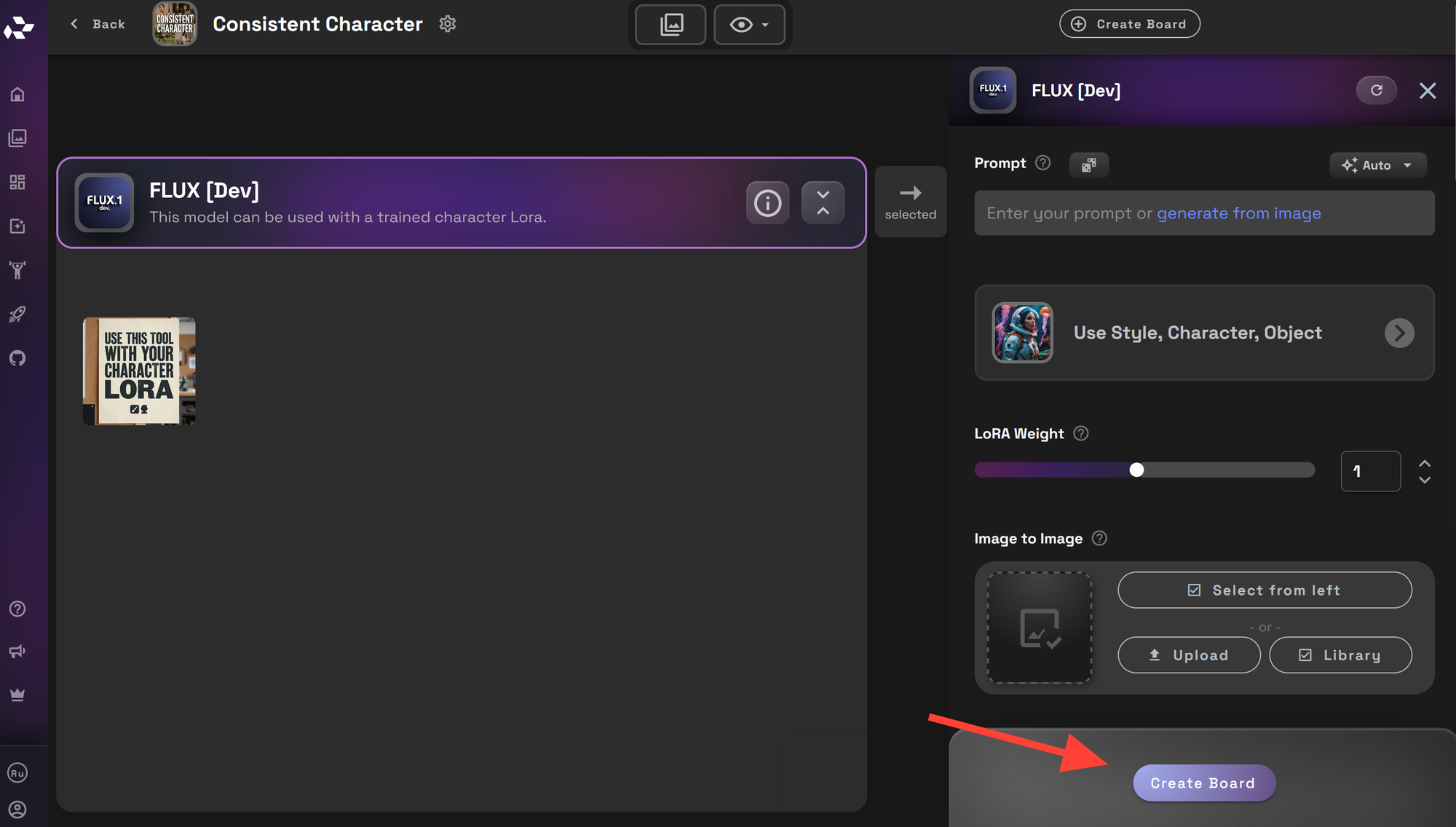
You may review the tools on the template then click Create Board.
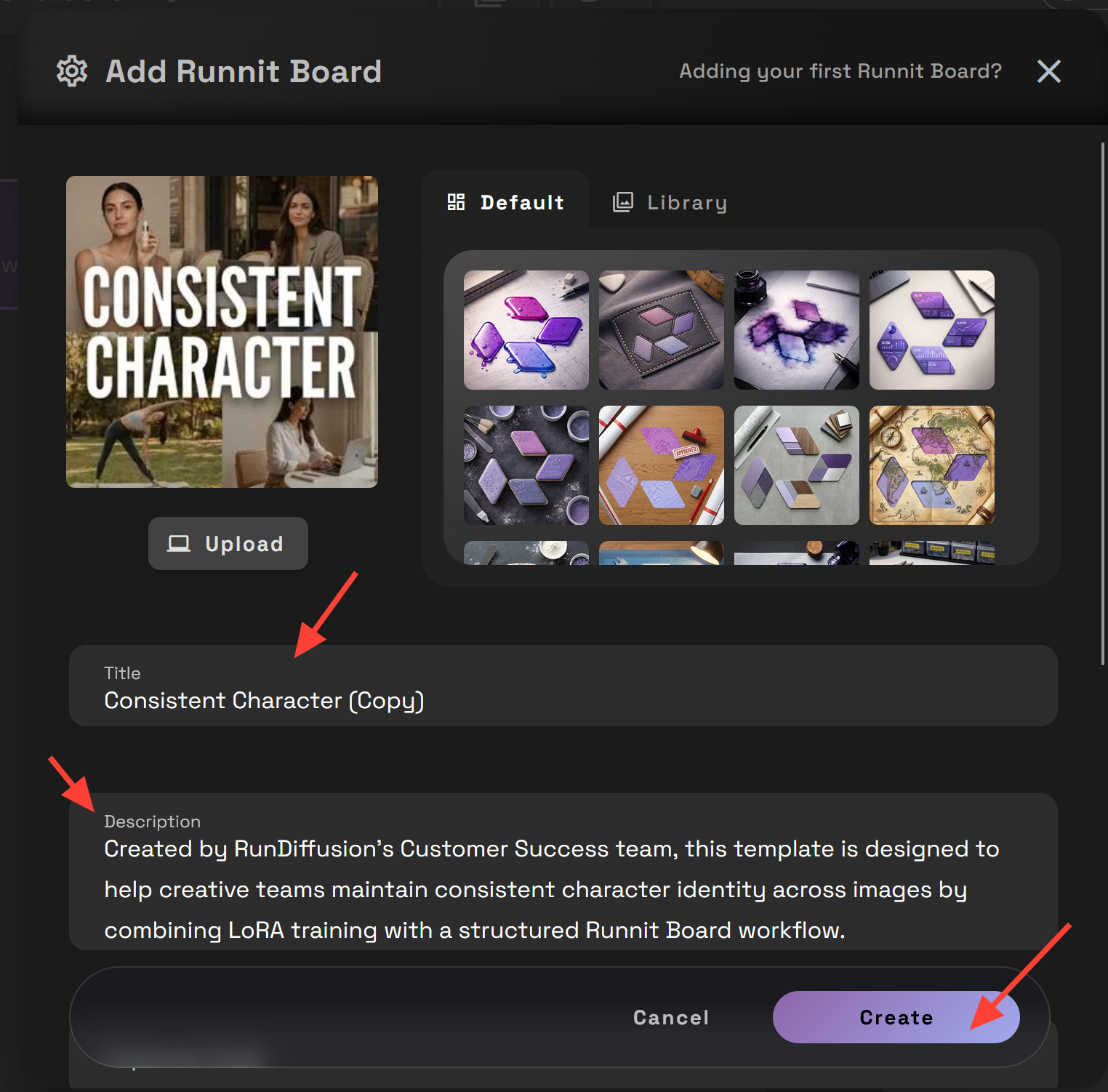
You can edit the title and description then click Create.
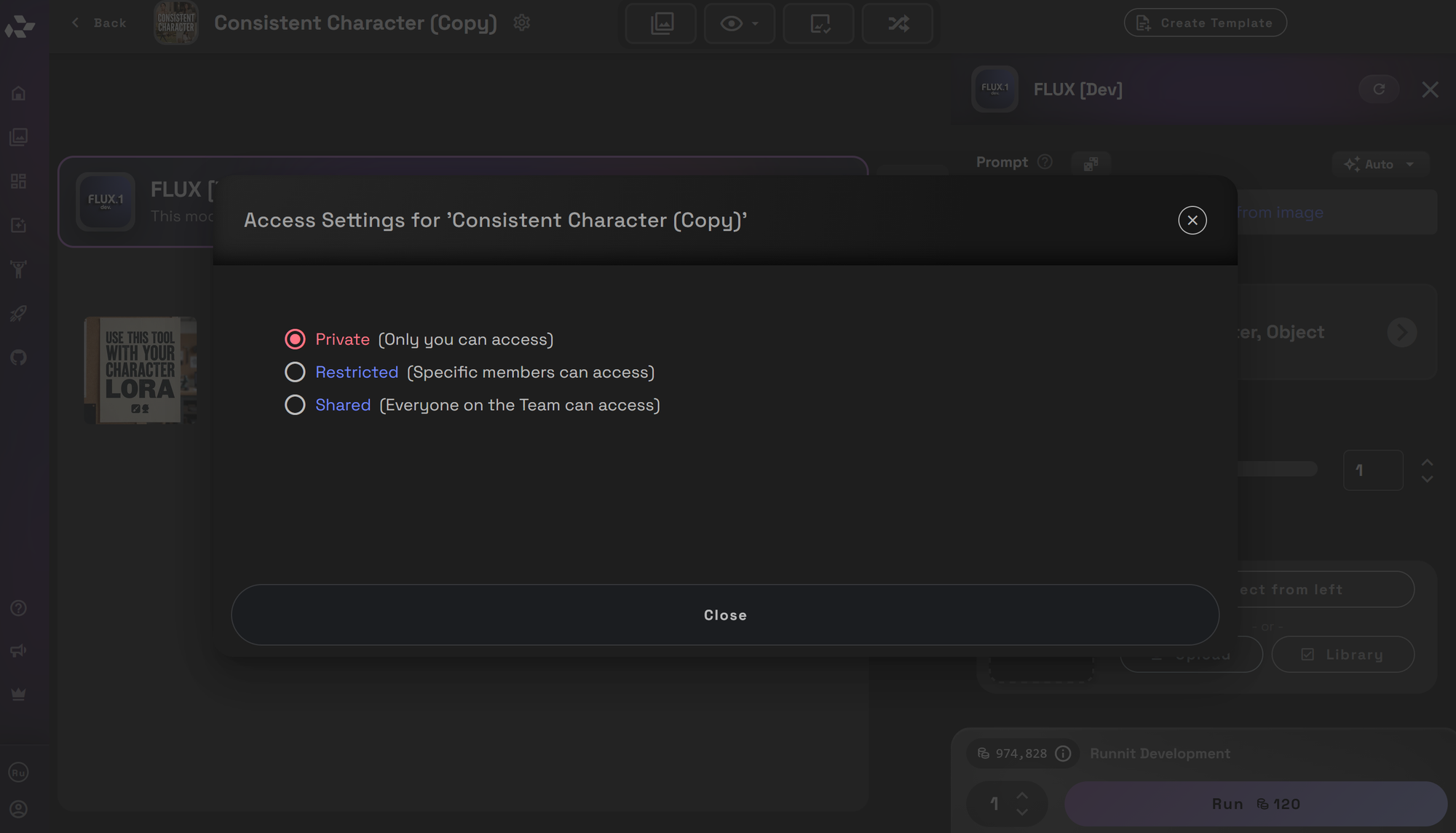
You can select if the board is private, restricted or shared.
You may then begin using the Consistent Character board.
Consistent Character Template
This template outlines how to generate, refine, and deliver consistent character. Each tool plays a specific role in the workflow and should be used intentionally.
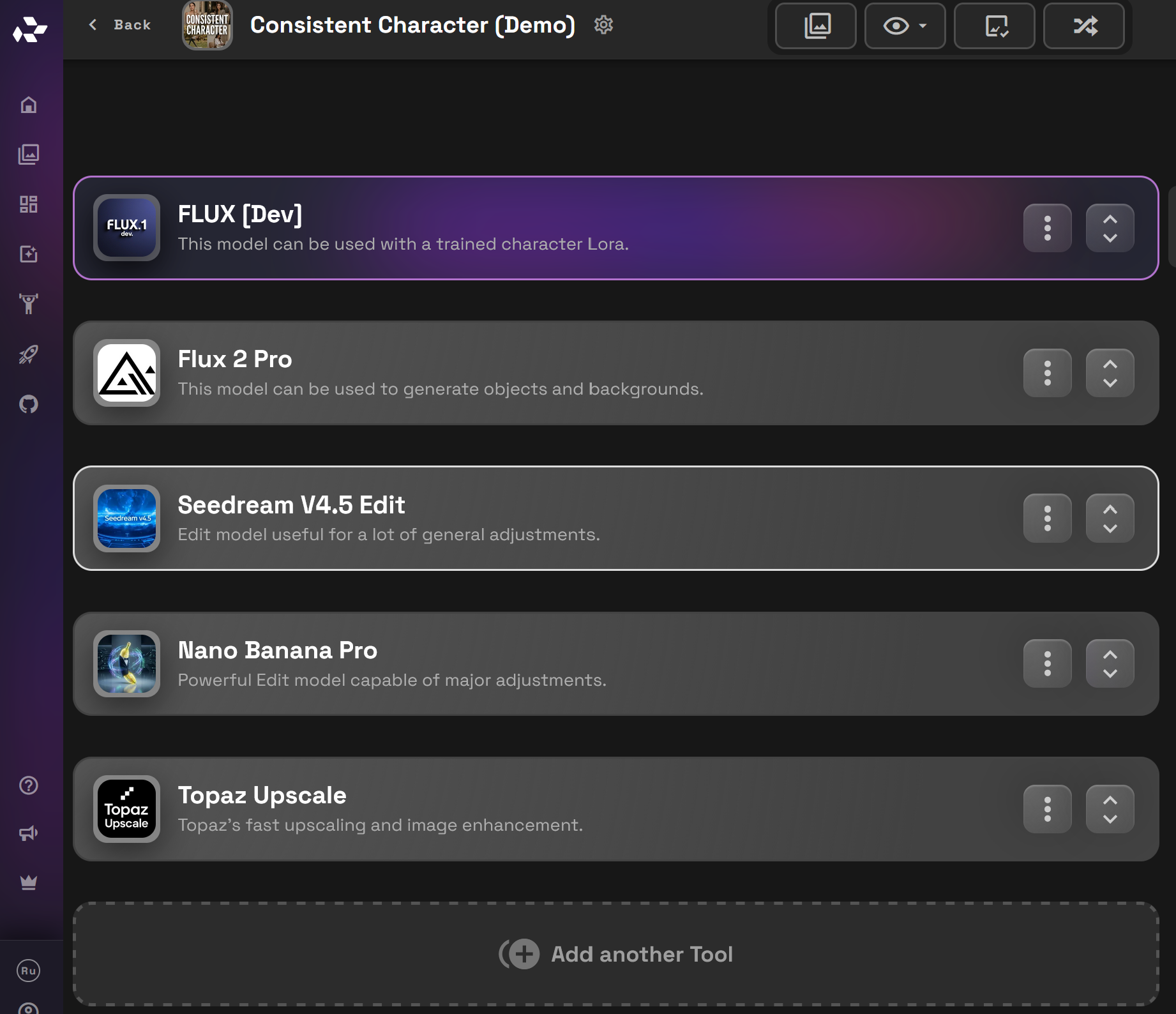
Flux [Dev]

Flux [Dev] is used for primary image generation once the character LoRA has been trained.
Use Flux [Dev] to:
- Place the trained character LoRA into new scenes
- Explore environments, lighting, and outfits
- Generate multiple variations efficiently
This is the default generation model for the template once character identity is locked. It is an affordable model to concept your character in different scenes.
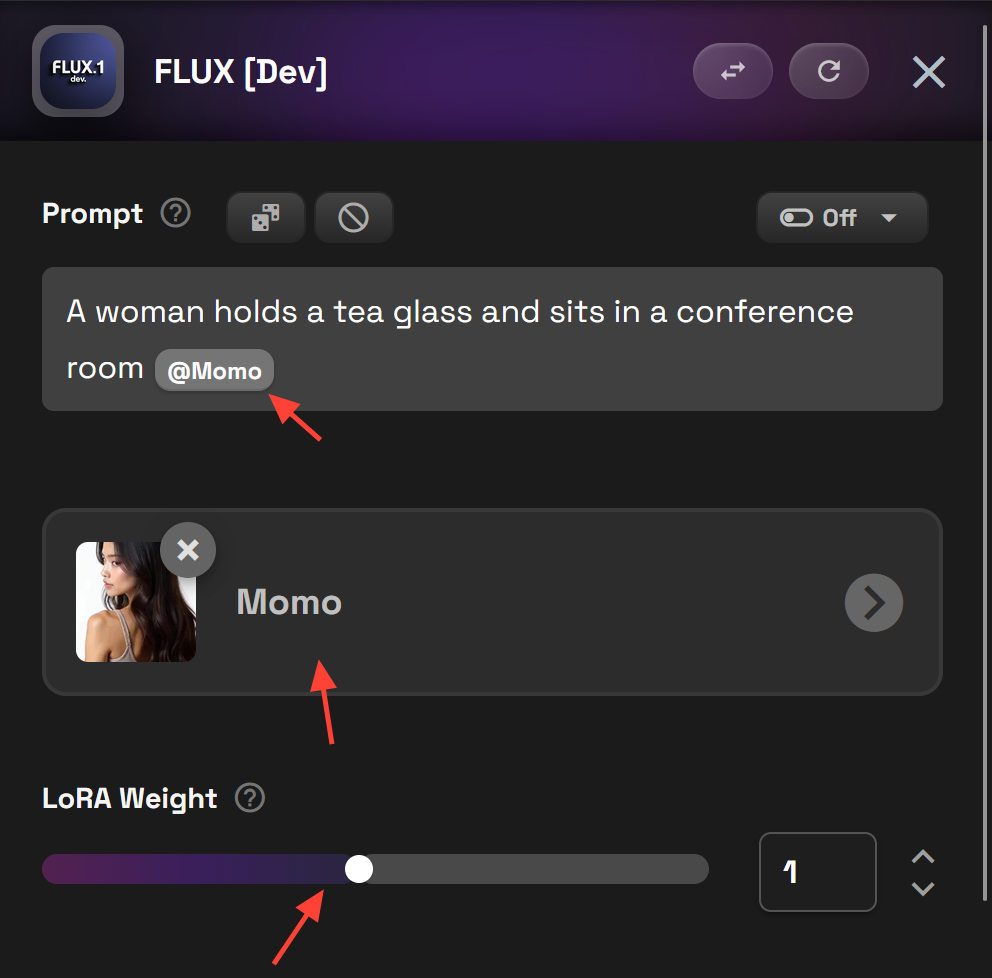
To invoke your Lora use the @ symbol and the name of your LoRa model. Example: @Momo You can also adjust the LoRa strength as necessary.

Flux 2 Pro (Optional)
Flux 2 Pro can be used after Flux [Dev] when additional diversity is needed in backgrounds, props, or scene composition. It offers more variation while remaining affordable, making it a useful option for expanding creative range without moving directly to heavier edit models.
Use Flux 2 Pro when:
- You need greater background or environmental variety
- Scenes require more prop diversity
- The character identity is already stable, but context needs to change
Flux 2 Pro works best once the character LoRA is trained and validated using Flux [Dev]. It should be treated as an extension of the Generate phase, not a replacement, and used selectively when additional variation is required.
TIP: Don't use the image Generated in Flux [Dev] for img2img work in Flux 2 Pro. Save that image and the images generated with Flux 2 Pro for the Edit Models which compiles them together.
Seedream 4.5

Seedream 4.5 is used for small refinements that do not require regenerating the image.
Typical uses include:
- Minor cleanup
- Subtle corrections
- Small visual tweaks
- Upscaling images to 4K
- Background changes
This step helps refine outputs while preserving character consistency.
Nano Banana Pro

Nano Banana Pro is used when more significant changes are required.
Use Nano Banana Pro for:
- Camera angle changes
- Recomposition
- Larger structural edits
- Upscaling images to 4K
- Adding Custom text
This tool is used selectively when minor edits are not sufficient.
Important: If you do not train a LoRa this model can do the heavy lifting to generate completely new scenes. To do that use your character as a Reference image and prompt a new scene.
Example Prompt: The picture of the woman holding a cup have her hold the cell phone as shown in the reference image, and place her in the conference meeting scene




Topaz Upscale

Topaz Upscale is used at the final stage of the template.
Use Topaz to:
- Increase resolution beyond 4K up to 10K
- Prepare images for print or high resolution marketing
- Deliver final production ready assets
Upscaling at this stage ensures maximum quality without impacting earlier creative decisions.
Optional Tools
Once the character identity is stable and approved, additional tools can be used as needed. These are not required for the core template. Click on Add another Tool to add additional tools to this Runnit Board.
Optional Video Models:
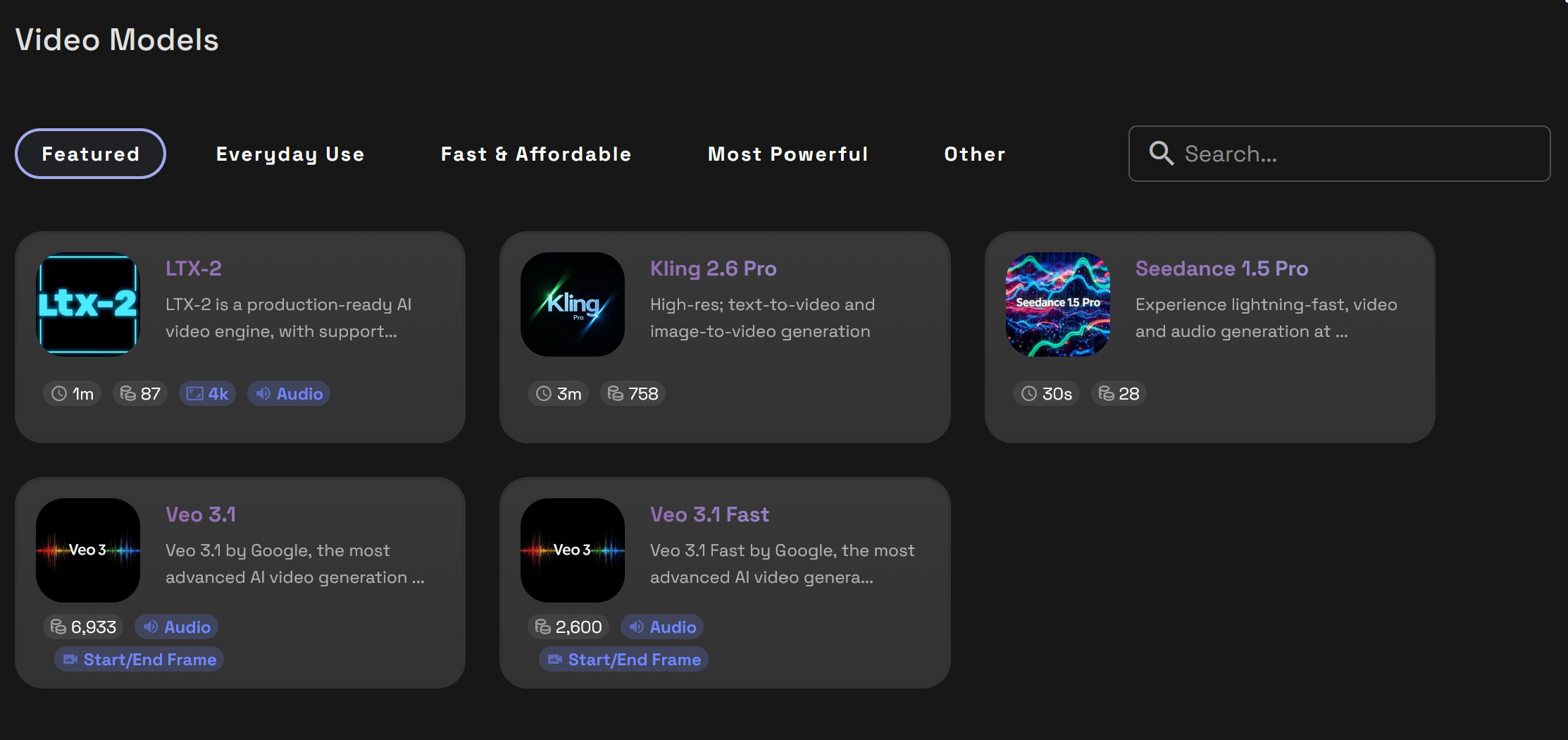
- Animate an already consistent character
- Add subtle motion, expressions, or camera movement
- Best used after character approval
Optional Video Upscaler:
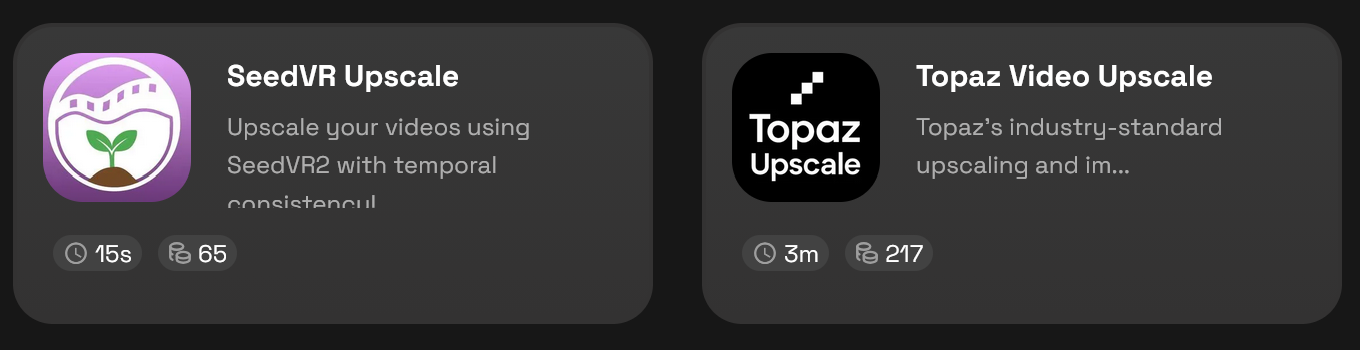
- Improve resolution and clarity of animated outputs
- Prepare video for presentation or delivery
These tools extend the workflow without changing the core structure of the template.
Summary
The Consistent Character Template provides a structured Runnit Board workflow for maintaining character identity across images. Teams working with stable characters should train a LoRA first, then use the board to generate, edit, and deliver consistent results. For fast-changing characters, the template also supports a single-reference approach using Nano Banana Pro.
 RunDiffusion Team
 RunDiffusion Team
Frequently Asked Questions
Do I need to train a LoRA to use the Consistent Character Template?
No, LoRA training is recommended but not required. If you need long-term character reuse and consistent identity across many images, training a LoRA is the best approach. If your character changes often or you only have a single reference image, you can use Nano Banana Pro without training.
How many reference images are recommended for LoRA training?
The ideal dataset size is 15 to 30 reference images. This provides enough variation for strong identity learning without unnecessary training overhead. Fewer images may work, but results can be less consistent.
Can I use Flux [Dev] without a trained LoRA?
Not for Consistent Characters. Flux [Dev] works best with a trained character LoRA. Without one, character identity may drift between generations. If you do not plan to train a LoRA, Nano Banana Pro is the better option for generating new scenes from a reference image.
When should I use Flux 2 Pro instead of Flux [Dev]?
Flux 2 Pro is useful after Flux [Dev] when you need more diversity in backgrounds, props, or scene composition. These images will not contain your character so are best compiled with Seedream 4.5 Edit or Nano Banana Pro.
Should I use images from Flux [Dev] for img2img in Flux 2 Pro?
No. Images generated in Flux [Dev] should be used along with images generated in Flux 2 Pro, and then used in the Edit models. Flux 2 Pro works best as part of the Generate phase, not as an img2img edit step.
What is the difference between Seedream 4.5 and Nano Banana Pro?
Seedream 4.5 is designed for minor edits such as cleanup, small corrections, background changes, and upscaling to 4K. Nano Banana Pro is used for major edits like camera angle changes, recomposition, adding custom text, or creating new scenes from a reference image.
Can Nano Banana Pro be used without training a LoRA?
Yes. Nano Banana Pro can handle full scene changes using a single reference image. This makes it ideal for short-term or exploratory workflows, but it is more expensive for long-term use compared to training a LoRA.
When should I use Topaz Upscale?
Topaz Upscale should be used at the final stage of the workflow. It is intended for increasing resolution beyond 4K, up to 10K, and preparing images for print or high-resolution marketing delivery.
Can I animate my character using this template?
Yes. Once the character identity is stable and approved, you can add optional video models to animate the character. These tools are extensions of the workflow and are best used after still images are finalized.
Is this template suitable for i-gaming workflows?
Yes. The Consistent Character Template works well for i-gaming use cases such as slot characters, themed game mascots, promotional assets, and seasonal visuals where character consistency across frequent updates is important.
Can I reuse the same board for multiple scenes or campaigns?
Yes. A single Consistent Character board can be reused to generate multiple scenes, variations, and deliverables for the same character. This helps keep all assets organized and consistent in one place.
