


Introduction
Sora 2 on RunDiffusion allows you to generate AI video directly from text prompts, making it a powerful tool for architectural visualization and motion-based renders. Instead of working with timelines or manual animation, you describe a scene and how it unfolds.
This Sora 2 Prompt Guide for RunDiffusion explains how to write clearer, more effective prompts, especially for architectural video renders. That way you can achieve smoother motion, stronger spatial consistency, and more usable results.
What Is Sora 2 on RunDiffusion?
Sora 2 is a text-to-video generation tool available on RunDiffusion that converts written descriptions into short animated video clips. For architects and design professionals, it works best as a concept and visualization tool rather than a final animation engine.
Common use cases include:
- Architectural video renders
- Exterior and interior motion studies
- Lighting and atmosphere exploration
- Early-stage client presentation visuals
Because Sora 2 runs entirely in the cloud, it fits naturally into modern architectural workflows without additional setup or hardware management.
Standard vs Pro: Which Should You Use?
Sora 2 is available across RunDiffusion plans, but quality and consistency vary depending on your output needs.
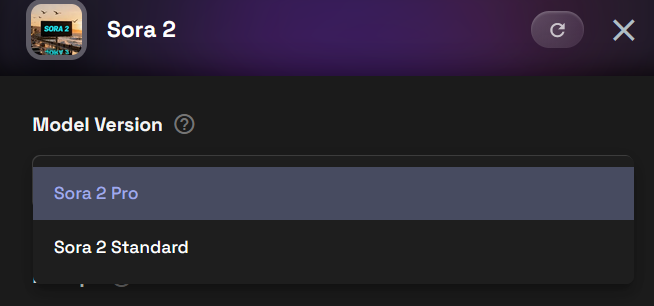
- Standard is ideal for testing ideas, early concepts, and prompt experimentation.
- Pro is recommended for professionals producing architectural video renders, where:
- Visual detail matters
- Motion stability is more important
- Outputs may be client-facing
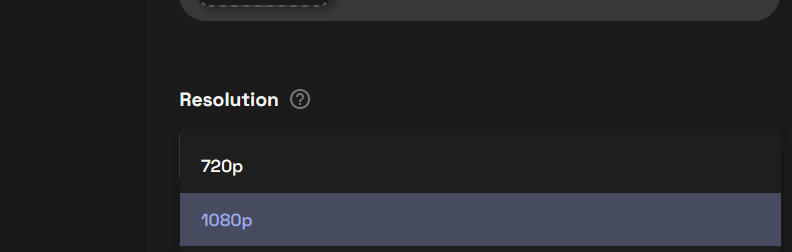
For professional work, we also recommend generating videos at 1080p resolution. Higher resolution helps preserve architectural detail, materials, and lighting, especially when videos are reviewed by clients or used in presentations.
Text-to-Video vs Image-to-Video in Sora 2
Txt2Video
Text-to-video is the most common way to use Sora 2. You describe the architectural scene, motion, and camera behavior, and Sora 2 generates a video from scratch.
Text-to-video works best for:
- Early-stage concept exploration
- Mood and atmosphere studies
- Rapid iteration on ideas
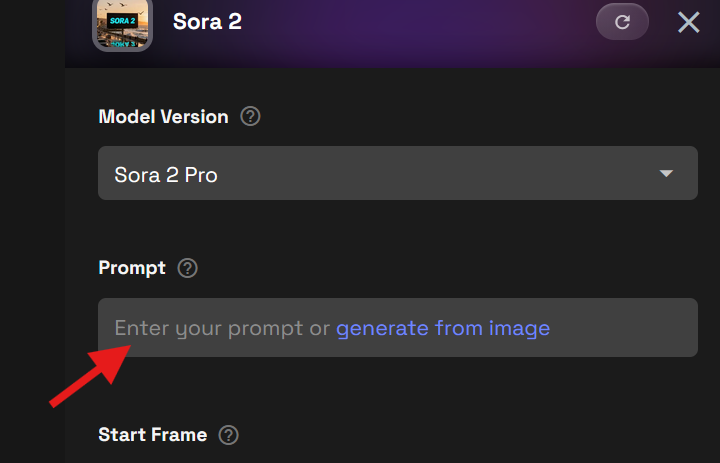
For Text to Video you can enter a prompt in the Prompt box.
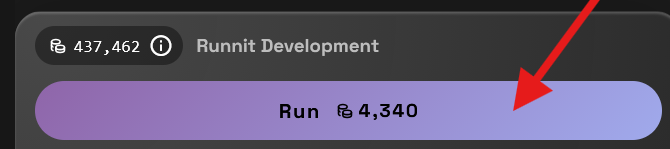
Then click Run to Render you video.
Img2Video
Image-to-video allows you to start from an existing architectural or product render or concept image and extend it into motion. This is especially useful when you already have a strong still image and want to explore movement, lighting changes, or subtle camera motion.
Image-to-video is well suited for:
- Bringing still architectural renders to life
- Creating engaging product videos
- Adding motion to approved design concepts
- Exploring how light and atmosphere evolve over time
Prompts for image-to-video should focus more on motion and camera behavior, since the visual composition is already established.
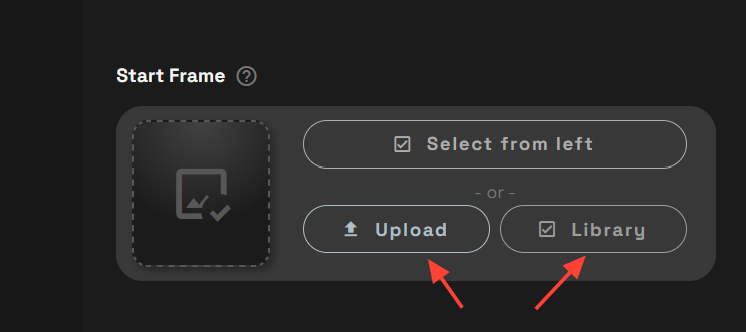
Enter a prompt.
Upload or Select an image from your Library.
Sora 2 Prompt Guide (General Best Practices)
Think in Shots, Not Frames
Sora 2 performs best when prompts describe a single shot unfolding over time, rather than a static description. This applies across all use cases, from environments to product shots to architectural renders.
Write prompts like you’re directing a short clip, not labeling a still image.
1. Start With the Core Action
Begin with what is happening in the scene before adding style or detail.
Example: A sunlit Mediterranean seaside villa clings to a rocky hillside above the ocean, white limestone walls and terracotta roofs glowing in late afternoon light, as the camera opens on a wide drone shot over the water and gently arcs inward toward arched terraces where sheer curtains billow in the breeze, the mood relaxed and timeless with warm natural colors and soft shadows, accompanied by distant waves, seabirds, and wind moving through olive trees, with no dialogue.
Sora 2 Video of a Mediterranean Seaside villa created on RunDiffusion
2. Define Camera Behavior Explicitly
If camera movement matters, state it clearly. Simple camera instructions are often more effective than complex ones.
Common patterns:
- Static camera, moving subject
- Slow forward tracking shot
- Gentle pan revealing the scene
Example: A futuristic glass skyscraper in Singapore’s financial district reflects the city at night, its parametric façade alive with internal light patterns. The camera opens with a fast-moving aerial push-in between neighboring towers, then decelerates into a stabilized close-up tracking shot along the building’s curved surface. Autonomous vehicles streak below as light trails, tropical humidity visible in the air, the scene rendered with ultra-clean sharpness and high dynamic range.
Sora 2 Video of a Camera flying through 2 towers at night in a city created on RunDiffusion
3. Focus on One Primary Event
Prompts with multiple competing actions can produce unfocused results.
Aim for:
- One subject or scene
- One main movement
- One camera behavior
If you need complexity, generate multiple clips and iterate.
Example: At sunrise in a desert-edge modernist museum inspired by Tadao Ando, smooth poured concrete walls cut by narrow slits of light, the camera begins with a wide aerial shot slowly descending toward the entrance as long shadows stretch across sand and stone, a single visitor walks along a shallow reflecting pool, wind subtly rippling the water, hyper-realistic cinematic photography with natural light, high dynamic range, sharp textures, and soft atmospheric haze, captured on a full-frame camera with a 24mm lens.
4. Use Environment to Reinforce Motion
Environmental details help motion feel believable and consistent.
Useful cues include:
- Wind, fog, rain, or smoke
- Moving light or shadows
- Flowing crowds, traffic, or water
Example: On a windswept black-sand beach in Iceland, a model wearing an avant-garde tailored coat with flowing fabric panels walks toward the camera. The shot opens wide with the volcanic landscape dominating the frame, then switches to a slow-motion medium shot as the camera circles the model. Fabric moves dynamically in the wind, ocean waves crash behind, muted natural tones contrasted with crisp garment detail, captured in cinematic realism.
5. Apply Style as a Modifier
Style should enhance a clear scene, not replace it. Avoid stacking unrelated styles, which can introduce visual instability.
Example: Inside a minimalist Japanese ryokan living space, tatami mats and natural wood beams bathed in soft morning light, the camera slowly dollies from the open shoji doors inward toward a low table set for tea, sheer curtains move gently in the breeze, garden greenery visible outside, extra-realistic cinematic interior photography with warm tones, shallow depth of field, and fine material detail, shot on a 50mm prime lens.
Using Sora 2 for Architecture
While Sora 2 is a general-purpose video tool, it is especially effective for architectural visualization when used thoughtfully.
Architectural users often apply it to:
- Exterior and interior motion studies
- Lighting and atmosphere exploration
- Extending still architectural renders into short videos
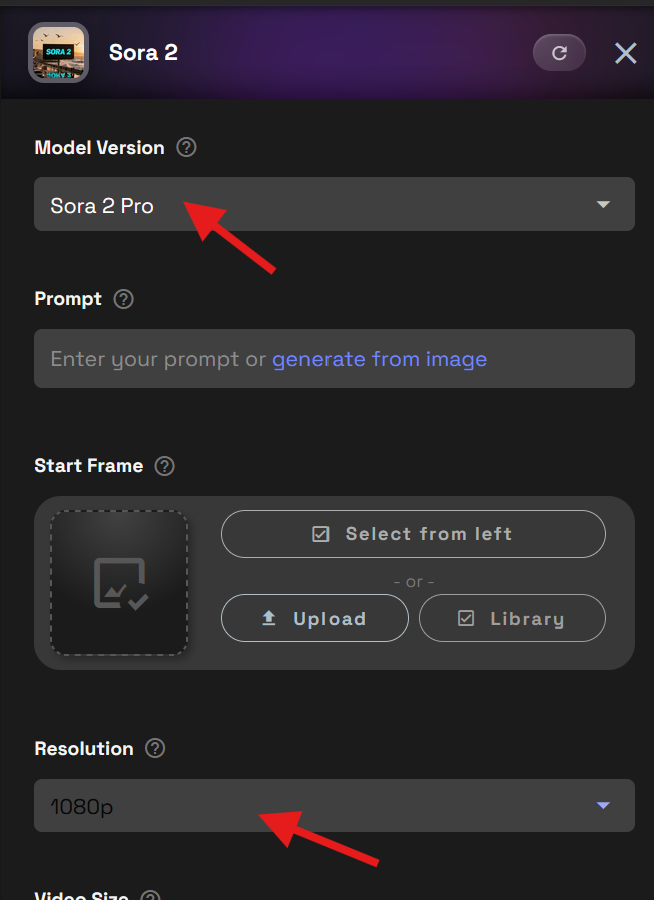
For architectural work use the Pro model at 1080p is strongly recommended to preserve material detail and spatial clarity.
Tips for Better Results With Sora 2
- Start with simple prompts and refine gradually
- Generate multiple variations instead of overloading a single prompt
- Reuse prompt structures that work well
- Match prompt complexity to clip length
- For professional output, use Pro with 1080p resolution
Content Restrictions and Moderation
Sora 2 is more heavily moderated than many other video generation models. Certain prompts or themes may be restricted, even if similar requests work elsewhere.
To avoid issues:
- Keep prompts professional and project-focused
- Avoid sensitive, unsafe, or restricted content
- Frame requests around environments, motion, design, and storytelling
- Avoid copyright or IP restricted content
These safeguards help ensure consistent and reliable output, especially for professional use.
Further Reading
Kling Prompt Guide
Juggernaut XI and XII Prompt Guide
Juggernaut Prompt Guide
LTX-2 Prompt Guide
Frequently Asked Questions (FAQ)
What is Sora 2 on RunDiffusion?
Sora 2 is a text-to-video generation model available on RunDiffusion. It converts written prompts into short video clips and is well suited for architectural visualization, motion studies, and concept exploration.
When should I use Standard vs Pro in Sora 2?
Use Standard for testing ideas, learning how prompts behave, or quick iterations. Use Pro when you need higher visual quality, more consistent motion, and professional-grade results, especially when working at 1080p resolution.
What’s the difference between Text-to-Video and Image-to-Video?
Text-to-Video generates a video entirely from a written prompt.
Image-to-Video starts with an existing image and animates it by adding motion, camera movement, or environmental effects.
How should I structure a prompt for the best results?
Focus on a single scene and one primary action. Write prompts like a short shot description rather than a long story, and avoid trying to pack multiple events into one generation.
Do camera instructions matter in Sora 2 prompts?
Yes. Clear camera direction—such as slow pans, tracking shots, or static framing—helps produce smoother, more predictable motion and more cinematic results.
How can environmental details improve my videos?
Elements like moving light, fog, wind, or reflections help reinforce motion and make scenes feel more dynamic and believable without overwhelming the prompt.
How important is style in a Sora 2 prompt?
Style should support the scene, not dominate it. Overloading a prompt with too many styles can reduce clarity and lead to unstable results.
Are there content or moderation limits with Sora 2?
Yes. Sora 2 has stricter moderation than many image models. Staying professional, descriptive, and project-focused helps avoid blocked or rejected generations.
What’s the best way to improve results over time?
Start simple, generate multiple variations, and refine prompts gradually. Iteration usually produces better outcomes than trying to perfect a single complex prompt.
